
Companies (Beta)
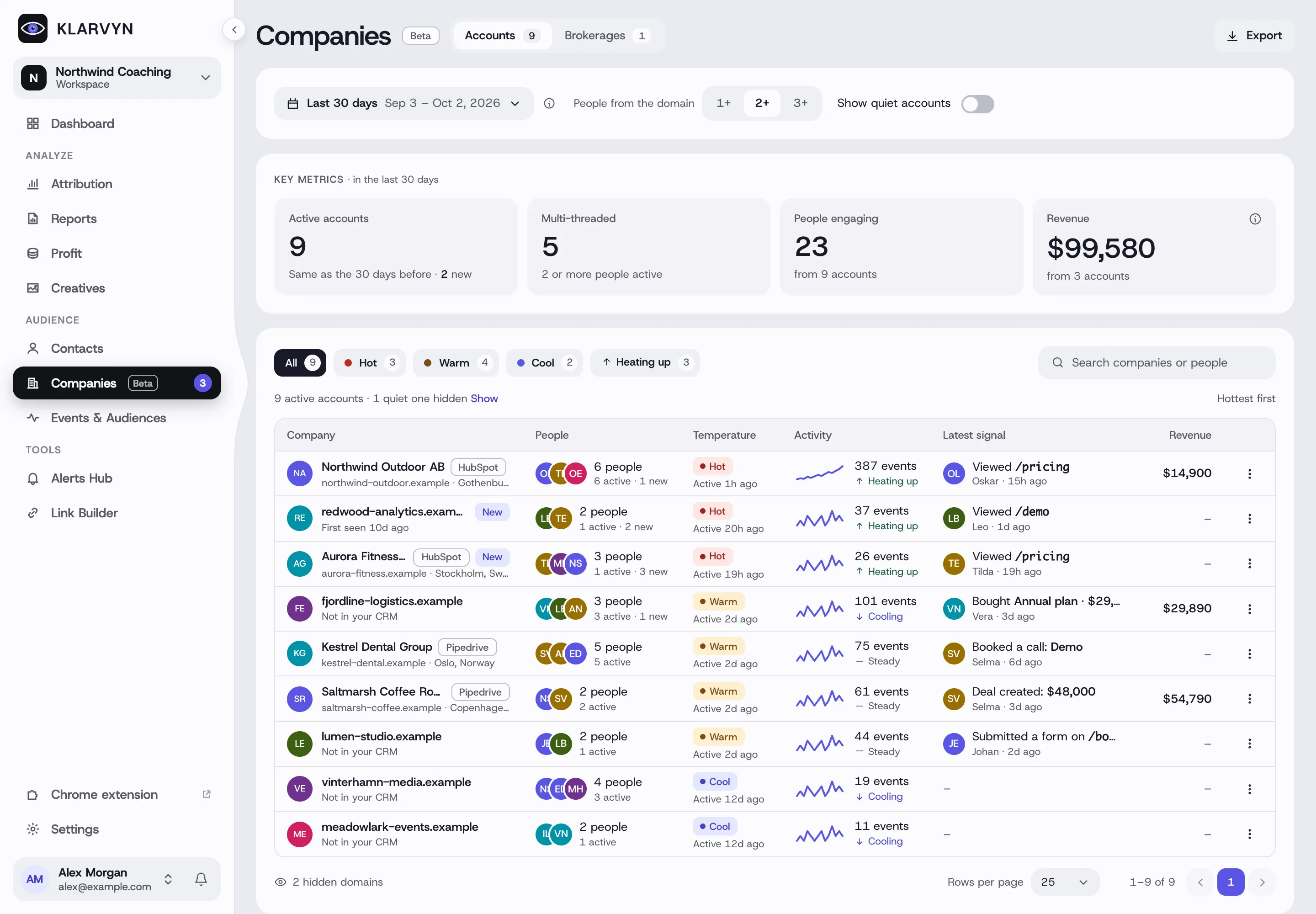
Companies answers the B2B question Contacts can’t: “which businesses are engaging with us — and is the buying committee heating up?” People are grouped by their company email domain into accounts. Each account shows its people, its temperature and momentum, its activity and revenue in the period, and its latest signal (a pricing page, a form, a booked call, a deal or a purchase).
The list
Section titled “The list”- Accounts and Brokerages are two tabs. A brokerage is a domain shared by independent people, like agents in one real-estate network.
- The period is the same date range as the rest of Klarvyn. Activity, revenue and the key metrics count that period.
- People from the domain: 2+ by default. Choose 1+ to also see company domains with one person, before concluding you have no B2B traffic. Your choice is remembered for the workspace.
- Quiet accounts: the list shows the accounts active in the period. Turn on Show quiet accounts to see the rest.
- Key metrics: active accounts (against the period before, and how many are new), multi-threaded accounts (2 or more people active), people engaging and revenue. Revenue is purchases and subscription payments, minus refunds and chargebacks; CRM deal values never count.
- Search finds a company by its name or domain, or by the name or email of anyone in it. Sort by clicking a column; filters, sort and page stay in the address, so you can share a link.
Temperature and momentum
Section titled “Temperature and momentum”These always look at the last few days, whatever period you pick:
- Hot: active in the last 24 hours, with 3 or more events in the last 7 days. Warm: active in the last 7 days. Cool: no activity in the last 7 days.
- Momentum compares the last 14 days with the 14 before: Heating up (3 or more events, and at least a quarter more), Cooling (a quarter fewer or less), Steady, or Quiet (nothing in 28 days). The small line is the last 28 days.
Changed in October 2026: temperature used to follow the date picker, so a period that ended before today never showed a hot account, and the sidebar badge could disagree with the page. Now the badge counts exactly what the Hot pill shows.
Hiding a domain
Section titled “Hiding a domain”Your own domain is hidden automatically. Use Hide from Companies in an account’s menu for your own team, test contacts, partners or suppliers: their people stay in Contacts, and nothing about tracking or attribution changes. Hidden domains at the bottom of the list shows them again.
The account
Section titled “The account”Click an account to open it:
- Journey — a chart of the buying committee (one row per person, a dot for each day they were active, diamonds for the account’s moments), then the account’s story day by day: each person’s visits, every conversion, and moments like “Second person joined the account”, “First high-intent page”, “Deal created” and “First purchase”. Show older days goes all the way back to the first touch.
- People — everyone from the account with inferred roles (Decision maker, Champion, Influencer), when they were first seen and how they came, and their activity in the period. Open shows the person in Contacts. If the same name shows up twice, merge the two contacts in Contacts so the account counts them once.
- Pages — the pages the account viewed, with views, people, average time and when they were last viewed.
- Export on the list and Export account in an account download CSV files.
Good to know
Section titled “Good to know”- Committee roles and momentum are heuristics, inferred from behavior — connect an enrichment source to confirm titles.
- Company names and locations come from your CRM’s company records when the domain matches — another reason to connect your CRM.
- Brokerages get people and pages but no journey or roles: the people on a shared domain don’t buy together.
- Company tracking is turned on and off in Settings › Workspace › Companies (B2B). If you turn it off, Companies and its badge leave the sidebar.